



📖 hypermarkdown.org — the documentation. What the format is, why it exists, and every construct in it. Start there.
HyperMarkDown (.hmd) is ordinary markdown plus wikilinks, and the cards they
connect form a knowledge graph. A card is one .hmd file:
- A link names a card. You write
[[name]]in square brackets, and it is resolved to the card's file and linked for you. - A link can carry its own text. In
[[foo|bar]]the pipe separates the two:foois the address of the card,baris what the reader sees. - A link can point inside a card.
[[tokens#Rotation]]is a heading oftokens, and[[tokens#^definition]]is one marked block of it. - A card can be built out of other cards. Put
!in front of[[foo]]as in![[foo]]and get the target embedded (transclusion) rather than linked: its content appears in place, so you say a thing once rather than twice. - A linter checks the whole graph, every link and every embed in it.
- A card can be an interactive notebook. HQL cells query the vault by structure and by meaning, with lexical and semantic search and graph traversal, and write their results into the card. HQL also reads JSON, YAML, and records, so one query can join the vault with other data.
Every .md file is already valid .hmd, so an existing tree of markdown files
is adopted one rename at a time: rename a file from .md to .hmd when you
want it in the graph, and the rest stay as they are.
See [[tokens#Rotation|the rotation window]], and say it once rather than twice:

![[tokens#^definition]]
And so much more:
| You write | What it is | How it is found |
|---|---|---|
[[tokens]] |
bare name | looked up for you, see below |
[[specs/login]] |
path | looked up the same way |
[[./tokens]], [[../billing/invoices]] |
relative path | from the folder of the card you are writing |
[[/shared/tokens]] |
absolute path | from the root of the vault |
[[design:tokens]] |
namespace-qualified | in another vault, see Namespaces |
A bare name or a path is looked up in four steps, and the first match wins: names the card imported, then the card's own folder and each folder above it, then the folders it imported with a wildcard, then one sweep of the whole vault. The sweep does not rank: two matches are an error, and you qualify the link.
Imports go in the frontmatter:
import:
  - from /shared import tokens as shared-tokens   # binds one name
  - from /glossary import *                       # adds a folder to the lookup
Any paragraph that ends in a caret and a name, like ^definition, can be
linked or embedded on its own.
A folder is a module. A vault is a tree of modules, marked by a .hmd/
directory at its root, and it is one namespace: every address in the table
above resolves inside it. A nested .hmd/ starts a new vault, and a link that
escapes the root is an error.
A namespace-qualified address reaches a card in another vault. The name before the colon selects the vault, and the path after it is resolved inside that vault by the same rules:
See [[design:tokens/color]] for the palette.The project grants each namespace in .hmd/config.toml. A card cannot
introduce one by mentioning it, so the set of vaults a build may read is one
file:
wiki = "doc/wiki"                # the default namespace: this project's own vault

[namespaces.design]              # a second vault on this filesystem
folder = "../design-wiki"

[namespaces.upstream]            # a vault served over HTTP
url = "https://wiki.example.org/"
Moving design from a folder to a server changes the binding and no card.
Status: the address form and the rules above are designed. Version 0.1
does not resolve them yet: [[design:tokens]] renders as a red link, and the
configuration keys shown are a sketch. Details are on the
Namespaces page.
specs/auth/login.hmd:14:5: error[HMD002] [[tokens]] matches 2 pages; qualify it
  (candidates: shared/tokens.hmd, specs/auth/tokens.hmd)
hmd lint checks the graph the way a compiler checks a program. A card you
have not written yet is a warning and renders as a red link, so forward
references become a to-do list. A malformed link or a name with two matches is
an error. Your prose is left alone.
TeX mathematics, D2 diagrams, callouts, collapsible sections, footnotes, task lists, and tables are part of the format. A diagram is text in the file, so it lives in version control and shows up in a diff you can read:
```d2
client -> edge: credentials
edge -> auth: verify
auth -> edge: token
```

A retry after attempt $n$ waits $t_n = \min(t_{max},\; b \cdot 2^n)$.
A card may also open with YAML frontmatter, a block of metadata about the card.
The tools read tags, use, import, and nav; any other key is free for
your own use.
A card can hold HQL cells, like the code cells of a
computational data science notebook. hql render runs each cell and writes its
output into the card, below the cell:
```hql#eval id=books
cards
| filter(c => c.name != "contents")
| sort(by = c => c.title)
```
<!-- hql:output id=books hash=7282fba97096 status=ok -->
- [[dune]]
- [[emma]]
- [[middlemarch]]
- [[the-hobbit]]
<!-- /hql:output -->- Three fences.
hql#evalruns and writes its output.hql#queryruns and writes nothing; it computes a value for other cells. A plainhqlfence is a code listing and never runs. - Cells read each other. A cell with
id=booksis available to the other cells of the card asbooks, for examplebooks | map(c => c.title). - Output format. By default a list of cards is written as wikilinks, a
record as a table, and a graph as a D2 diagram. End the query with
| csv,| json,| yaml, or| mermaidto choose another format. - Data. A query can filter, sort, and group the cards of a vault by their frontmatter, follow links and backlinks, and run lexical and semantic search. It also reads JSON, YAML, and records.
<!-- notes.md — valid markdown, and already valid HyperMarkDown -->
Tokens rotate hourly. See [the token format](../shared/tokens.md).
<!-- notes.hmd — the same file, with the graph filled in -->
Tokens rotate hourly. See [[tokens]], and here is the rule itself:
![[tokens#^rotation-rule]]Rename one file, add one link, then run hmd lint or install the VS Code
extension (see below). The rest of the vault can stay plain Markdown until you
choose to convert it.
Markdown is JavaScript; HyperMarkDown is TypeScript.
Every Markdown file is already valid HyperMarkDown, the way JavaScript is already valid TypeScript. TypeScript adds types to the language you had. HyperMarkDown adds the knowledge graph, and HQL, a strongly typed expression and query language that runs inside a card. HQL queries the vault by structure and by meaning, with semantic retrieval and graph traversal, and assembles context for an AI agent. The same pipelines read and write files, SQLite, PostgreSQL, Kafka, NATS, and Databricks or Spark tables.
The MkDocs plugin builds a tree of cards into a site. hypermarkdown.org is built that way from the cards in this repository, and the VS Code extension previews a card beside the file as you type.
This repository contains both the hmd language specification and its tools:
- the language — its specification, the records that argue it, and the website they are published as
- and the tools that implement it, one package each under
tools/.
Each tool carries its own version, README, ChangeLog, and license.
hmd — the CLI, the library, the MkDocs plugin


The Python implementation, published to PyPI as
hypermarkdown: the hmd command
(lint, render, graph), the library under it, and a MkDocs plugin that
builds a tree of cards into a website. Canonical — where two implementations
disagree, this one defines the answer. It will also host the language server.
@hypermarkdown/core — the TypeScript implementation


A second implementation of the format, not extension code. It answers to the same conformance corpus the canonical tool does.
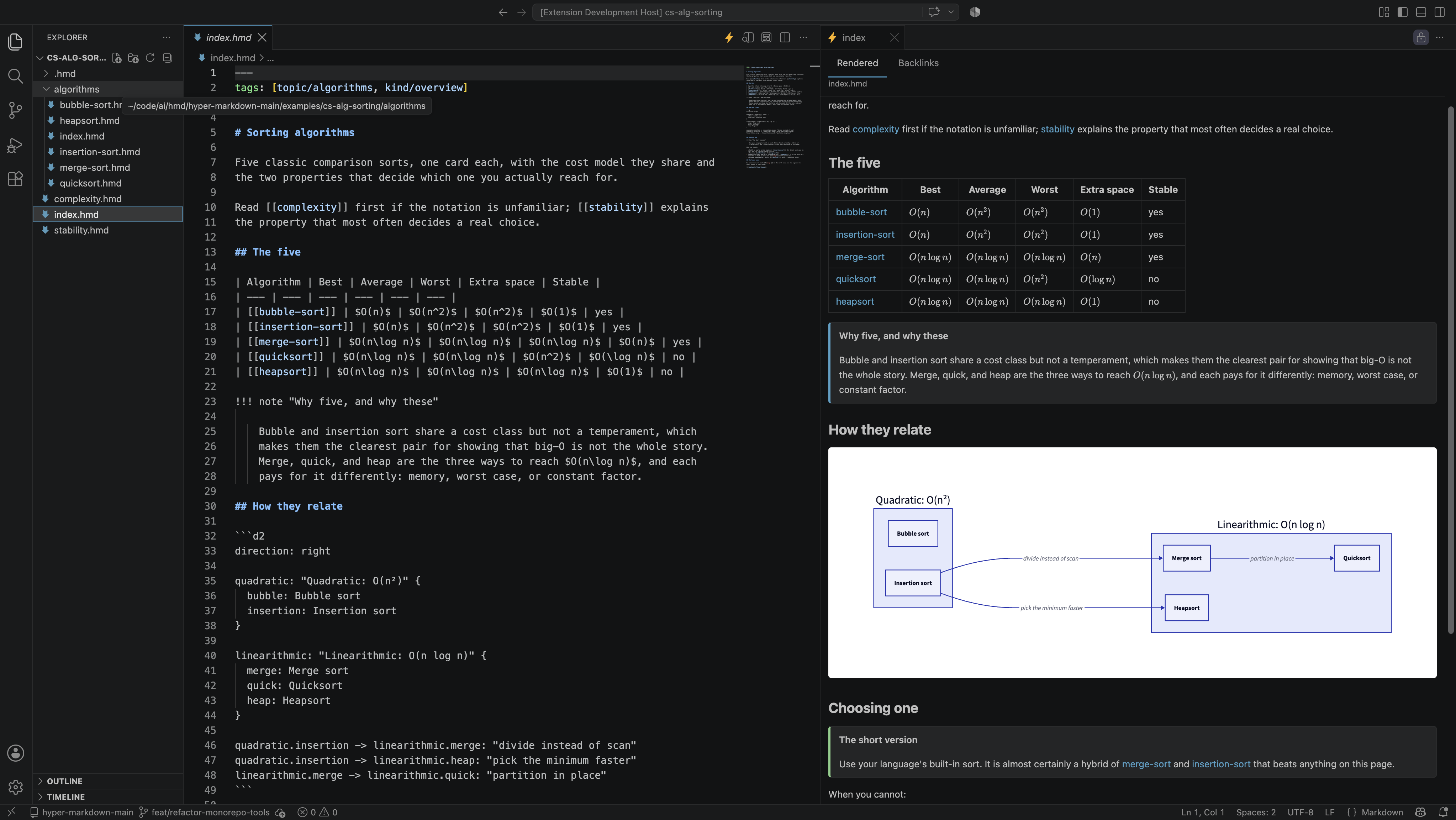
VS Code extension — an editor for .hmd with real-time preview


A full editor for .hmd: syntax highlighting, a preview that renders the
unsaved buffer as you type and keeps the embed boundary visible, a graph of the
vault, red links with a create-the-card action, diagnostics, and HQL cells you
can edit and run as a notebook. Rendering is in TypeScript, so there is nothing
to install to see a card. Completion and the rest of the language-server
features arrive with the Python server.
Install from the VS Marketplace in VS Code, or from Open VSX in Cursor, Windsurf, and VSCodium. One build is published to both, and the ID is the same either way:
ext install hypermarkdown.hmd
HQL — the Hyper Query Language


A strongly typed expression and query language, in a separate repository with its own releases and documentation at
hql-lang.org. Pipelines of filter, map, sort,
group, lexical and semantic search, and graph traversal over a vault's
cards, frontmatter, and links, and over JSON, YAML, and records. Inside a card
it runs as cells; hql render writes their output into the page.
cargo install hql --locked # or a release binary from its releases pageexamples/— runnable fixture wikis, linted by both, andexamples/conformance/cases/— the language-neutral corpus that arbitrates between the two implementationsdoc/— the knowledge base the website is built from: the book, the.hmdwiki, and the numbered proposals that specify everythingtests/— the repository's own guards, for its prose and its site
- DEVELOP.md — the language and the website: how the documentation tree is organised, the four versions, and how hypermarkdown.org is published. Read this first.
- A tool's own guide for its code — the Python tool, the TypeScript core, the extension. Each carries that tool's test loop, gates, and release.
doc/proposals/— numbered specifications. A change to the format or the tooling starts as one; reserve its number indoc/proposals/README.md.doc/status/— progress, tracked per tool:lang.mdfor the format,hmd.md,ts-core.md, andvsc-ext.mdfor the three tools, andpages.mdfor the site. Updated in the same commit that changes the code, and the only place work is tracked.- Kanban board - in
doc/issues/**, for the repository's own work, and for the language and the website, as well as the tools. The board is public, but the issues are owned by the contributors team. - CONTRIBUTORS.md — add yourself in the same commit as your first merged change. Every license file here names HyperMarkDown Contributors and points at that list, so this is where credit lives.
Most contributions are to the language and the site — the prose, the proposals,
the .hmd wiki — and that work needs Python even though none of it is Python:
this repository's documentation is a wiki, built by the MkDocs plugin the
Python tool ships. The sync installs that toolchain; the serve gives you a local
preview on 127.0.0.1:8000 that rebuilds as you edit.
git clone https://github.com/ewiger/hypermarkdown
cd hypermarkdown
uv sync --locked      # MkDocs, the plugin, and the `hmd` command
uv run mkdocs serve   # preview the book and the wiki as you write
Writing .hmd in a tree of your own needs none of that today — the VS Code
extension previews a card beside the file you are typing
in, and the preview is TypeScript end to end. Install it from the VS
Marketplace
or Open VSX, or build the
VSIX from this clone: its README.
Before opening a PR, run whichever half you touched:
uv run python -m pytest    # the Python tool and the site
npm install && npm test    # the TypeScript tools
Feature requests, issues and PRs are welcome at
GitHub issues.
Once accepted, a PR should be merged into the main branch, and the issue closed. Again, Kanban board - in doc/issues/**, for the contributors (or agents) to track the progress of the issue and the PR internally.
Two licenses, split on the one boundary this repository already has.
- The code is MIT — see LICENSE. The three tools under
tools/, the fixture wikis and the conformance corpus underexamples/, the guards undertests/, and the configuration at the root. Each tool carries its own identical copy. - The documentation is CC BY 4.0
— see LICENSE-DOCS. Everything under
doc/: the book, the.hmdwiki, the language specification, and the numbered proposals.
The specification exists to be quoted, translated, and reimplemented — the conformance corpus is an invitation to write a third implementation. MIT is a software license and asks for nothing when prose is reused; CC BY asks for credit and nothing else, which is the right trade for a document. The corpus itself stays MIT deliberately, because it gets vendored into implementations and an attribution clause on fixture data is friction with no upside.
Attribute the documentation as:
HyperMarkDown documentation, © 2026 HyperMarkDown Contributors, CC BY 4.0 — https://hypermarkdown.org/
The copyright holder is the project rather than a person; the people are named in CONTRIBUTORS.md.