Repository navigation
Failed block media uploads do not provide option to retry #20184
Description

Expected behavior
When the media attached to a block fails to upload, tapping the block should provide the option to "retry" the upload within an Action Sheet.
This ability was originally added in #10935 and #15363. The regression may have been introduced in f3f9fc7. This feature works as expected on WordPress for Android.
Actual behavior
The only option provided is "Stop Upload."
Screenshot
RPReplay_Final1677071441.MP4
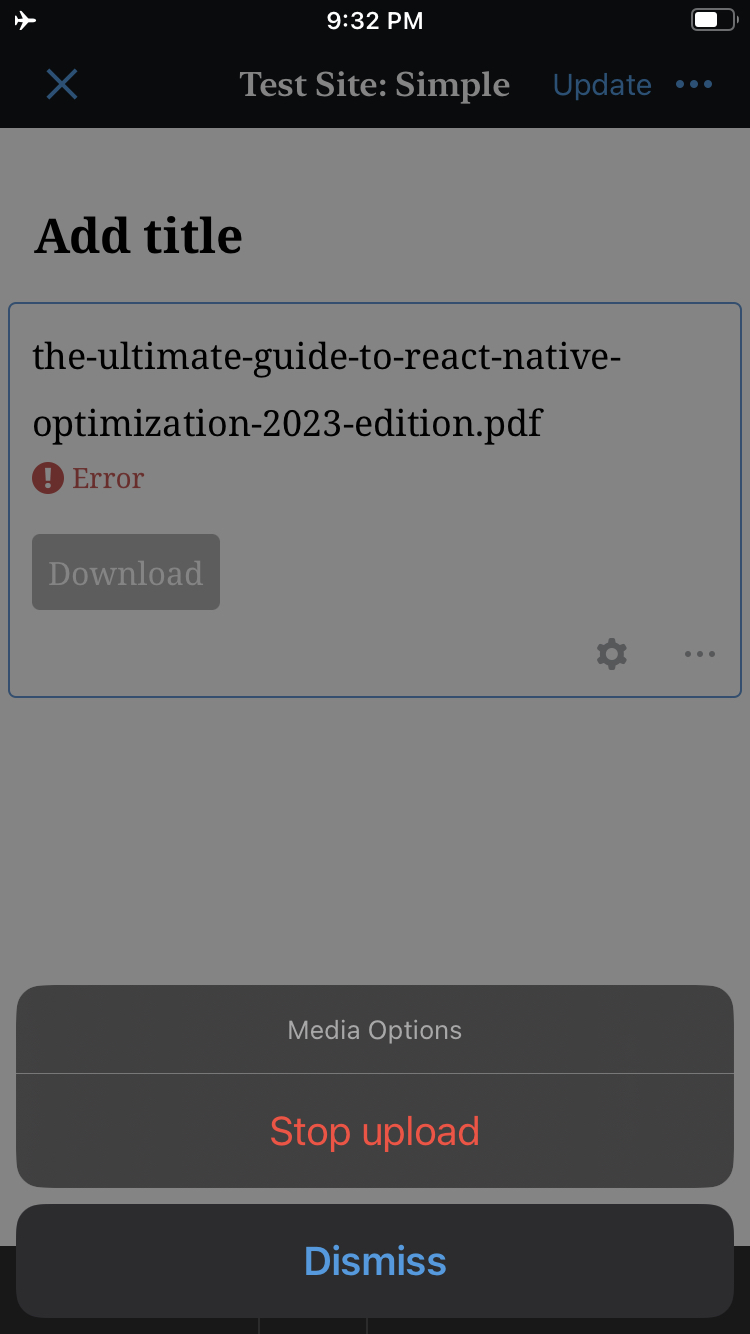
Steps to reproduce the behavior
- Add an Image or File block.
- Begin uploading media to the block.
- Disable the device's internet connection.
- Once the upload fails, re-enable the device's internet connection.
- Tap the block with the failed media.
Note
As referenced in a comment, deleting and reinstalling the app resolved the issue. Consistent reproduction steps are unknown.
Activity
dcalhoun commentedon Feb 22, 2023
Deleting and reinstalling the WordPress app resolved this issue. It appears as though the app, block, or file experienced some form of caching that resulted in the "Retry upload" button not displaying as expected. I do not know how to reproduce this caching issue at this time.
dangermattic commentedon Mar 5, 2026
Thanks for reporting! 👍
jkmassel commentedon Oct 31, 2026
This could be closed as can't-reproduce. The Retry action is in the code:
gutenbergDidRequestMediaUploadActionDialogadds it when the upload has failed and can be retried. The original problem went away after reinstalling the app and was never reproduced consistently.To verify: on a current build, make a block media upload fail (for example, go offline mid-upload), tap the block, and check that Retry is offered.
Generated by Claude Code
jkmassel commentedon Oct 31, 2026
Simulator test plan. Sign in using
docs/simulator-sign-in.md. Build from currenttrunk.Setup: WordPress.com token. You need a way to make an upload fail, such as Network Link Conditioner set to 100% loss on the host Mac, or stopping the host's network mid-upload.
Pass: the action sheet offers Retry, and the upload succeeds after you restore the network and tap Retry. Note which editor the build used, legacy or GutenbergKit.
Generated by Claude Code
jkmassel commentedon Oct 31, 2026
Repro run (2026-10-30, trunk e64c851, iPhone 18 Pro simulator / iOS 27.0, Jetpack Debug)
Result: Not reproduced ❌: Retry was offered. Recommend closing. The report never had consistent steps and no fix was identified, so this doesn't show the original cause was fixed.
Steps (exact, minimal):
Expected / actual: As expected. The "Media Options" sheet offered Stop upload and Retry. After Retry the image finished uploading, and the attachment count on the server went from 0 to 1.
Differences from the plan: the server was down before the upload started, so this was not a failure partway through an upload. We used a self-hosted site rather than a WordPress.com token. GutenbergKit wasn't tested. The File block and a relaunch between failure and retry weren't tested either. Retry is still hidden when the local file is missing (
Media.canRetry), which we also didn't test.Evidence: failed block, the sheet with Retry, and the block after Retry:
Generated by Claude Code